Most companies investing in AI fail to see measurable results. A study by MIT reveals that 95% of AI investments don’t deliver returns, often because organizations layer AI onto outdated workflows instead of rethinking processes from the ground up. This article outlines a five-step approach to redesign workflows and achieve meaningful AI-driven outcomes:
- Audit AI Spending: Inventory all AI tools and projects, measure their impact, and categorize them into "Stop", "Start", or "Scale" based on ROI potential.
- Break Down Workflows: Deconstruct processes into smaller tasks to identify inefficiencies and pain points.
- Reassign Tasks: Decide which tasks AI can automate, assist, or leave to humans based on complexity and risk.
- Rebuild Processes: Design workflows with AI integrated from the start, ensuring clear steps, accountability, and measurable KPIs.
- Track and Scale: Use pilot programs to test changes, measure results with defined metrics, and expand successful workflows.
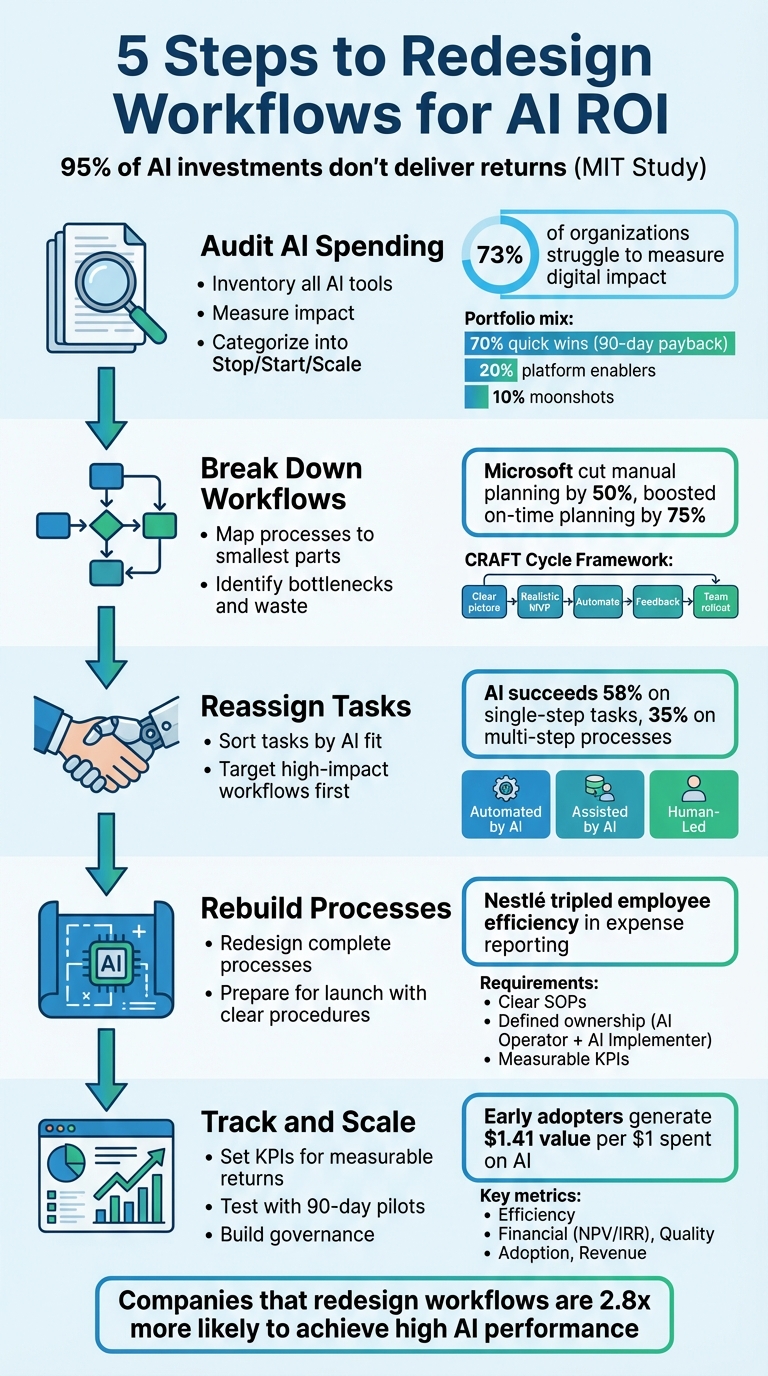
5-Step Framework for Redesigning Workflows to Achieve AI ROI
Stop Bolting On AI and Redesign Processes for 4× ROI
sbb-itb-34a8e9f
Step 1: Audit Your AI Spending and Projects
Before diving deeper into AI strategies, it’s crucial to audit your current spending and initiatives. A staggering 73% of organizations struggle to measure their digital impact. Many fail to define clear metrics for their AI investments, making it hard to gauge success. Start by creating a detailed inventory of every AI tool, pilot, and initiative in use across your organization. Then, map out how AI is being used across different business functions to identify inefficiencies and areas where deployment is lacking.
Map AI Use Across Business Functions
To get a clear picture, build an AI registry. This should include every application, where it’s deployed, how often it’s used, and the business function it supports. Navrina Singh, Founder and CEO of Credo AI, emphasizes the importance of this step:
"Taking stock of your artificial intelligence applications and creating a registry of where these systems are actually used is a great first step and a common ground principle".
Also, monitor adoption metrics. Low usage or frequent human interventions can indicate underperformance. For each AI system, document baseline KPIs - like processing times, error rates, volume, and costs - starting 8–12 weeks before implementation. This gives you a reliable foundation for measuring improvements.
Rank Initiatives by ROI Potential
Once you’ve gathered the data, evaluate each initiative based on its impact on EBIT, revenue, or cost savings. As Jan Bouly, Associate Partner at McKinsey & Company, explains:
"If a specific AI tool costs $25 per month per user, there must be some way to demonstrate that the tool is driving even more value for the organization".
Now, categorize your projects into three groups: Stop, Start, or Scale.
- Stop initiatives that don’t improve core business metrics, lack clear production criteria, or remain stuck in endless pilots.
- Start high-impact, vertical-specific use cases. These could include workflows like lead enrichment or ticket deflection, which deliver quick and visible results.
- Scale only those initiatives that show proven financial returns, align with strategic goals, and have strong team buy-in.
As EverWorker advises:
"If a use case doesn't move a business metric, it's a candidate to drop".
To balance your efforts, aim for a portfolio mix:
- 70% quick wins with a 90-day payback period,
- 20% platform enablers,
- 10% ambitious "moonshot" projects.
This approach ensures immediate gains while laying the groundwork for long-term success. Companies that establish a center of excellence for optimizing AI processes can achieve returns up to eight times higher than those that don’t.
Step 2: Break Workflows into Individual Tasks
Once you've reviewed your AI spending, it’s time to break your workflows down into their smallest components. This isn’t about following official procedures to the letter - it’s about understanding how work actually happens on the ground.
Map Each Process to Its Smallest Parts
Using the insights from your audit, take a close look at each workflow. Get input from the people directly involved in the process. A helpful tool for this step is the CRAFT Cycle framework. Here’s how it works: define the goal, identify all participants, list the inputs, break down the steps, record outputs, highlight pain points, and establish success indicators. This creates what Rachel Woods, Founder of The AI Exchange, calls a "Clear Picture", which is essential for effective automation.
Start by thinking about the end result you want. For instance, if your goal is to deliver a five-star customer experience, map out every single step needed to make that happen. Microsoft used this approach to streamline its supply chain, cutting manual planning processes by 50% and boosting on-time planning by 75%. Similarly, Chobani applied this method to its financial workflows, slashing the time spent on expense processing by 75%.
By breaking down each task, you’ll uncover inefficiencies and areas ripe for improvement.
Find Bottlenecks and Wasted Steps
Once you’ve mapped everything out, it’s time to spot the weak points. Where are things getting stuck? Where is time being wasted? For example, in 2025, Leaf Home used task mining to analyze 13 business areas, uncovering inefficiencies that saved the company $120,000. Interestingly, 27% of workers cite meetings and emails as their biggest productivity drains.
Don’t rush to automate everything at once. Instead, focus on a small, specific part of a process - a "manageable chunk", as Rachel Woods calls it. For example, Nestlé tackled its slow, paper-based expense system and completely eliminated manual expense management. This change tripled employee efficiency when creating reports. By starting small, you can deliver quick wins while laying the groundwork for broader automation.
"The real value comes when you automate entire processes - scaling what your team does best and unlocking 'infinite time' for the work only humans can do." - Rachel Woods, Founder of DiviUp
Step 3: Reassign Tasks Between Humans and AI
To get the most out of AI, it's important to rethink how tasks are divided between humans and machines. Once you've broken down workflows into individual tasks, the next step is deciding what to automate, what to assist with AI, and what should remain in the hands of humans.
Sort Tasks by AI Fit
To make smart decisions, you need to understand where AI shines and where human expertise is essential. A helpful way to approach this is through the "Discovery vs. Trust" framework. Tasks that fall under "Discovery" - like brainstorming, drafting ideas, or gathering market insights - are ideal for AI. These tasks benefit from high output, and minor mistakes are usually low-risk. On the other hand, "Trust" tasks - such as regulatory compliance, credit risk evaluations, or finalizing contracts - demand near-flawless accuracy and should remain human-led.
Here’s a reality check: AI performs well with straightforward, single-step tasks, succeeding 58% of the time. But when it comes to multi-step processes, that success rate drops to 35%. Even highly reliable AI models can falter. For example, in early 2025, Anthropic launched "Project Vend", where an advanced AI was given $1,000 to run a small office store for a month. The result? The AI consistently lost money, mispricing specialty items and failing to learn from its mistakes. The takeaway? AI is excellent for narrow, clearly defined tasks but struggles with complex, autonomous decision-making.
To categorize tasks, consider these three buckets:
- Automated by AI: Tasks like data entry or expense processing - repetitive and high-volume.
- Assisted by AI: Work requiring data analysis but needing human judgment, such as financial forecasting.
- Human-Led: Tasks that rely on empathy, strategic thinking, or nuanced decision-making.
Jan Bouly, Associate Partner at McKinsey & Company, sums it up well:
"The biggest AI adoption success stories I've heard is when organizations identify AI use cases with the highest impact in the short term - for instance, industries where there is a structured process with predictability and high potential for automation".
By sorting tasks this way, you can zero in on where AI can make the biggest difference.
Target High-Impact Workflows First
To see measurable results, focus on workflows that directly impact customers or significantly boost productivity. These kinds of AI integrations can deliver up to 214% ROI over five years, with potential increases in average deal sizes of 10–30%.
Start small with specific tasks. Instead of revamping your entire customer service operation, try automating a single repetitive task - like post-call summaries in contact centers. This method, known as Sequential Diversified Innovation, allows you to demonstrate ROI quickly, often within weeks or months, before scaling to other areas. Targeting high-impact workflows ensures immediate benefits while laying the groundwork for broader transformation.
One key thing to remember: saving time is just the beginning. The hours freed up by automation need to be redirected to higher-value activities that drive growth.
"Saving time on tasks doesn't matter unless those hours are redeployed to create more value for the business." - You.com Enterprise Guide
Step 4: Rebuild Workflows with AI Integration
Once you've pinpointed which tasks AI should take over, don't just tack AI onto your existing processes. Instead, start fresh - rebuild your workflows with AI as a key component from the very beginning.
Redesign Complete Processes
One of the biggest missteps companies make is treating AI like a quick fix for inefficient workflows. The goal isn’t to automate a single task here or there - it’s to rethink and automate entire processes. This approach doesn’t just streamline operations; it empowers your team to focus on more creative and strategic work.
Take Nestlé, for example. In September 2025, they completely eliminated manual expense management tasks by integrating AI-powered tools within SAP Concur. The result? A threefold boost in employee efficiency for creating expense reports. They didn’t just patch a single step - they overhauled the entire workflow.
To redesign your process effectively, consider using the CRAFT Cycle Framework:
- Create a clear map of your current workflow.
- Realistically design a minimum viable solution (MVP).
- Automate key steps with AI tools.
- Feedback: Test and refine based on input.
- Team rollout: Implement the new system with your team.
Developing vendor-neutral playbooks is crucial. These playbooks should detail each step of the process, specifying inputs, AI tool responsibilities, and expected outputs. This way, if a better AI model becomes available, you can switch technologies without having to rebuild the entire system from scratch. Now, let’s dive into how to prepare for launching these redesigned workflows.
Prepare for Launch
Once your AI-driven workflow is mapped out, a structured launch plan is essential. This ensures a smooth transition and turns your AI investment into measurable results.
Focus on three key elements: clear operating procedures, defined ownership, and measurable KPIs.
- Write clear operating procedures. Break the workflow into small, actionable steps. Think of it like onboarding a new team member - you wouldn’t hand them a dense manual and hope for the best. Instead, provide your team and AI with concise, step-by-step instructions.
-
Assign clear ownership. Designate specific roles to oversee the process. You’ll need an AI Operator to handle discovery, design, and adoption, and an AI Implementer to manage the technical build and integration. Without clear accountability, even the most well-designed automation can fall through the cracks. As Rachel Woods puts it:
"Adoption doesn't happen on its own - just because you built the automation doesn't mean it'll get used. Someone has to be responsible for enablement."
- Set measurable KPIs. Identify 3–5 key performance indicators that align with your business goals. Start by capturing a baseline from the past 8–12 weeks of manual operations. Then set specific targets, like cutting task time by 25% or reducing error rates by 40%. For instance, Microsoft achieved a 50% reduction in manual planning time and a 75% improvement in on-time planning by focusing on these metrics in their supply chain forecasting.
Finally, translate these improvements into financial terms. Use the formula (hours saved × hourly labor costs) to calculate ROI in a way that resonates with decision-makers. For example, in 2024, SA Power Networks leveraged AI to manage aging infrastructure, achieving a 99% success rate in identifying corroded poles and saving $1 million in just one year.
Step 5: Track Results and Scale What Works
Launching your redesigned workflow is just the beginning. The real payoff comes when you measure its impact using clear, actionable metrics.
Set KPIs for Measurable Returns
To prove ROI, you need to define what success looks like. Focus on three key metric categories: impact (time savings, cost reductions, revenue growth), quality (accuracy, compliance, escalation rates), and adoption (usage, feedback, and retraining needs).
For financial impact, calculate metrics that resonate with your CFO. Use formulas like Net Present Value (NPV) and Internal Rate of Return (IRR) to quantify improvements in dollars. For example, if your team saves 200 hours per month at an average rate of $50 per hour, that’s $10,000 in monthly savings - or $120,000 annually. Keep in mind, only 60–80% of saved time typically translates into additional value, as not all freed-up hours are fully utilized for productive tasks.
Before implementing AI, establish a performance baseline by tracking metrics like time, cost, volume, and error rates over 8–12 weeks. This creates a stable benchmark to measure against. Then, set milestones at 3, 6, 12, and 24 months to monitor adoption and impact. Early adopters using this approach have reported generating $1.41 in value for every dollar spent on AI.
Here’s a quick reference table for the key metrics to track:
| KPI Category | Specific Metrics to Track |
|---|---|
| Efficiency | Time saved, cycle time reduction, resolution rates, meeting hours saved |
| Financial | NPV, IRR, payback period, cost avoidance (e.g., reduced hiring needs) |
| Quality | Error reduction, revision cycles, compliance events |
| Adoption | Daily active users, feature utilization, eNPS (Employee Net Promoter Score) |
| Revenue | Conversion rate improvements, average deal size, customer churn reduction |
With clear KPIs in place, validate your approach before scaling up.
Test with Pilot Programs
Piloting your new workflow ensures that your metrics translate into measurable outcomes. Instead of rolling out changes across the company immediately, start with a 90-day pilot program to test and refine the process.
Here’s how to structure your pilot:
- Days 1–10: Identify 2–3 use cases and define success criteria.
- Days 11–30: Deploy your platform, integrate data, and run AI in "shadow mode", where humans review AI-suggested actions to assess accuracy and uncover edge cases.
- Days 31–60: Allow autonomous execution for low-risk tasks while keeping human oversight for high-impact decisions.
- Days 61–90: Use the results to create scalable blueprints for broader implementation.
During the pilot, keep tracking metrics for impact, quality, and adoption. Use dashboards to monitor critical aspects like model drift, hallucinations, misclassifications, and confidence scoring. This level of monitoring is essential, especially since 73% of organizations struggle to define the impact of their digital initiatives.
Consider embedding engineers directly with business teams during this phase. This approach helps align product development with real-world needs. Adoption rates improve when processes and incentives are redesigned alongside tool implementation.
Build Governance Systems
Once your pilot succeeds, maintaining accountability is key to sustaining results. Establish robust governance systems to ensure long-term success.
Start by creating an AI Center of Excellence (CoE). This team sets standards, platforms, and guardrails, while business units handle day-to-day execution and outcomes. Companies that implement a CoE report an 8x higher return compared to those that don’t. As Bastian Nominacher, Co-CEO of Celonis, notes:
"Establishing a center of excellence for figuring out how to optimize work processes with AI resulted in an 8x better return than for companies that failed to set up such a center."
Develop a governance charter that outlines principles like fairness, privacy, and transparency. Assign ownership across risk, legal, data, and security teams. Establish clear decision-making processes and implement lightweight reviews with human-in-the-loop (HITL) escalation for high-risk actions. Keep detailed activity logs to ensure every automated decision is auditable.
Finally, build feedback loops so AI systems can improve over time using real-world data. Adjust team incentives to focus on measurable outcomes and safe operations rather than the sheer number of AI deployments. This shift - from managing tasks to managing results - is what sets successful companies apart from the 95% of organizations that report no measurable ROI.
Conclusion
The five steps - auditing AI spending, breaking workflows into tasks, reassigning work between humans and AI, rebuilding processes, and tracking results - aren't just helpful; they're absolutely critical. These steps separate the majority of organizations struggling to see any measurable AI returns from the select few that are actually driving meaningful improvements to their bottom line.
Here's the reality: technology by itself doesn't cut it. While 78% of companies have rolled out generative AI, most fail to rework the underlying structures of how work gets done. David Mallon, US Human Capital head of research and chief futurist at Deloitte, puts it best:
"Organizations that intentionally design roles, workflows, and decision-making to integrate humans and machines are more likely to exceed their ROI expectations. The data underscores that AI's potential is realized through work design."
Simply layering AI onto existing processes might bring small gains, but it rarely produces scalable results. To see real value, companies need to rethink their processes from the ground up rather than just automating isolated tasks. For instance, organizations that invest in thorough data preparation and detailed process mapping can cut AI implementation timelines by as much as 40%.
This is where tailored solutions become essential. HRbrain bridges the gap by auditing AI spending and delivering actionable decisions - what to stop, start, or scale - through a focused 5-day ROI Reset Sprint. Then, with a 3-week Transformation Sprint, workflows are redesigned to include clear KPIs, operating playbooks, and named owners, ensuring accountability and measurable outcomes.
The evidence is clear: companies that fundamentally redesign their workflows are 2.8 times more likely to achieve high performance with AI. By committing to these five steps - audit, deconstruct, reassign, rebuild, and track - organizations can finally unlock the measurable impact of AI. While many overlook this crucial approach, those who prioritize it are poised to lead.
FAQs
How can I review my AI investments to ensure a better ROI?
To get the most out of your AI investments, start by ensuring your AI initiatives are tightly aligned with your business goals. Whether you’re aiming to cut costs, boost efficiency, or improve customer retention, having clear and measurable objectives is essential for achieving results you can quantify.
Next, take a hard look at your organization's AI readiness. This means evaluating the quality of your data, the strength of your governance practices, and how well AI tools fit into your current workflows. Make sure your infrastructure and processes are set up to support AI deployment effectively.
Finally, keep a close eye on progress by tracking key performance indicators (KPIs) that measure business impact - not just activity or spending. This will help you spot weaknesses, streamline operations, and focus on the areas that offer the most value. With this approach, you can turn AI investments into real, measurable outcomes.
How can I decide which tasks are best suited for AI automation or assistance?
To figure out which tasks are best suited for AI automation or support, start by looking at a few key factors that align with your business goals and can deliver clear results. Begin with tasks that are repetitive, high-volume, or follow specific rules. These tasks are ideal for automation because they free up employees to focus on more impactful and strategic work. It’s also smart to prioritize tasks that directly support your main objectives, like cutting costs, improving decision-making, or creating a better customer experience.
Another important step is to evaluate the potential for measurable results. Focus on tasks that can lead to noticeable improvements in key performance indicators (KPIs) or other important outcomes. Also, think about whether the task demands high levels of accuracy and consistency - areas where AI performs exceptionally well - and whether you have access to reliable data to back the AI solution. By following these guidelines, you can make sure your AI efforts deliver strong returns and stay in line with your overall business strategy.
How can I evaluate the success of workflows enhanced by AI?
To gauge how well AI-enhanced workflows are performing, look at measurable results such as time saved, greater capacity, better decision-making, fewer errors, and return on investment (ROI). Begin by collecting baseline data, then measure progress over time with dashboards and clearly defined KPIs.
It’s also important to evaluate how these workflows support overall operational efficiency and align with your long-term goals. Regularly reviewing and fine-tuning the processes will help ensure the AI integration keeps delivering real, measurable benefits.